BroodMinder Setup Guide: Connecting BLE Sensors to Your Hive
Step-by-step guide to installing BroodMinder T2, TH, and W scale sensors. Covers placement, battery life, BLE range, the Bees app and MyBroodMinder, and what to do when things go wrong.
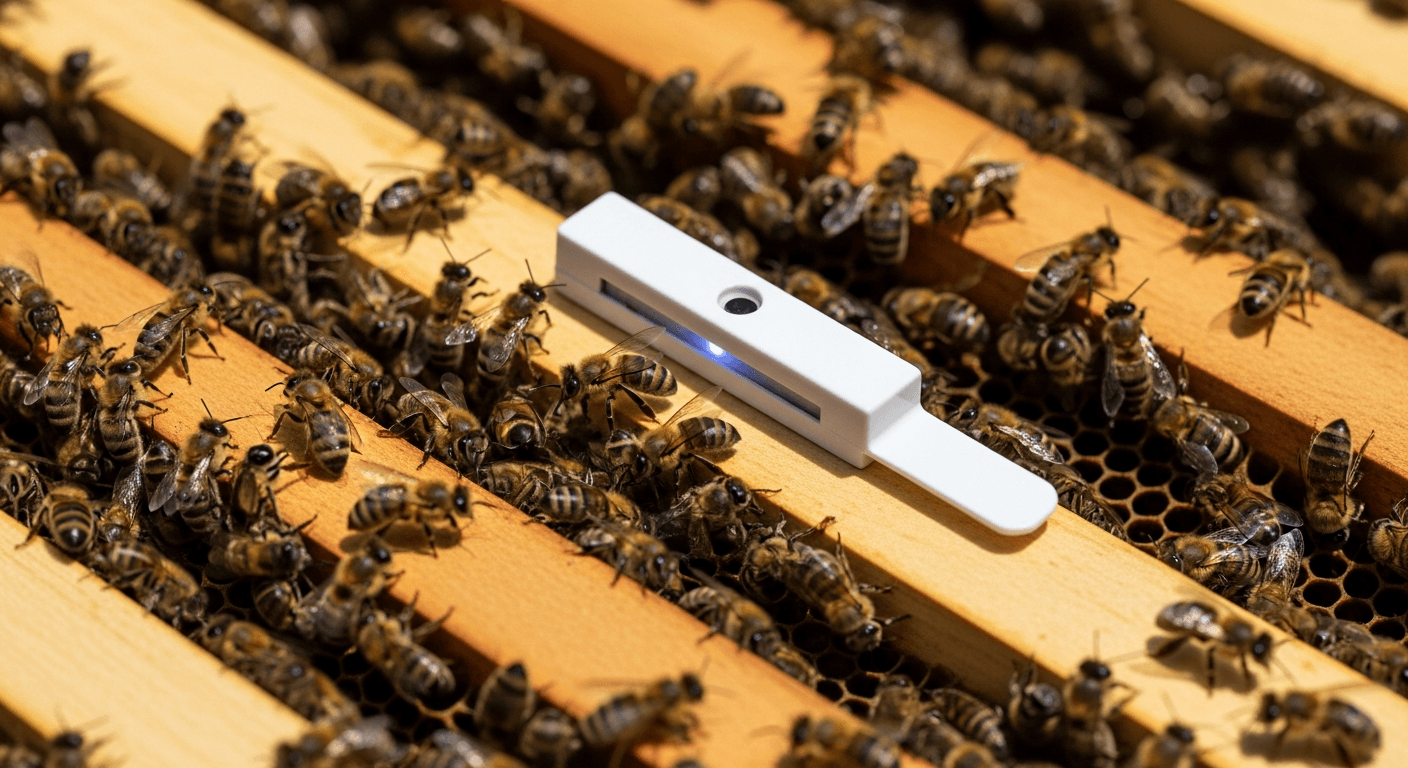
What BroodMinder Actually Does
BroodMinder sensors sit inside (or under) your hive and broadcast temperature, humidity, and weight readings over Bluetooth Low Energy. They are, for most hobbyist and sideliner beekeepers, the lowest-friction way to see what's happening inside a colony without opening the lid.
The sensors don't stream data in real time. They log a reading every hour to internal memory (BroodMinder puts the capacity at "about one year of measurements"), advertise their latest data over BLE, and hand the full history to your phone whenever you walk close enough to the hive. Which means — critically — you can skip a month of syncs and still recover every reading when you get back.
This guide walks through the three products you're most likely to buy, where to put them, what to expect from battery life and range, and the mistakes that show up over and over in forum threads. If you're weighing BroodMinder against the wider field of hive sensors, our overview of the latest innovations in smart beehives ranks the whole stack — scale, temperature, sound, and AI alerts — by cost and value.
The Current BroodMinder Lineup
BroodMinder's product names lag their hardware revisions. The internal sensors you'll buy today are marketed as "T2SM" and "TH2SM," but the units shipping since February 2023 are actually T3/TH3 revisions — no activation button, just pull the "remove before use" tab and they're live. If you buy new, you get the current revision; if you inherit a used setup, check whether there's a button.
Here's what you're choosing between:
| Model | What it measures | Accuracy (as published) | Battery | Price (single) |
|---|---|---|---|---|
| BroodMinder-T2SM | Temperature | 1°F | CR2032, more than a year | ~$48 |
| BroodMinder-TH2SM | Temp + humidity | 1°F (humidity: not published) | CR2032, 2 years | ~$77 |
| BroodMinder-W (Model 57) | Hive weight (one side) | Not published | 2x AAA, about 2 years | No longer in BroodMinder's store |
| BroodMinder-W3 | Hive weight | Not published | AA, 2 years | ~$242-363 (kit or assembled) |
| BroodMinder-W5 | Weight, temp-compensated | 0.01 lb (5 g) resolution | AA, 5+ years | ~$260 |
| BroodMinder-SubHub | BLE relay/buffer | — | 4x AA, more than a year | $130 |
| BroodMinder-Cell (T91) | Cellular gateway | — | Rechargeable, every 4-6 months | $180 + Premium membership |
Figures from BroodMinder's store and documentation, checked 28 September 2026.
The Citizen Science Kit (around $339-394 depending on sensor choice) bundles a W5 scale with two internal sensors.
Where to Put the Sensors
T / TH internal sensor placement
The standardized BroodMinder placement is on top of the middle frame — frame 5 in a 10-frame Langstroth, counting from the left as you face the hive front. This isn't arbitrary. Heat rises, the brood cluster is typically in the middle of the box, and using the same position in every hive means your data can be compared against other beekeepers globally in the BroodMinder community dataset.
Two exceptions:
- Cold climate, multi-box setups: Move the sensor under the inner cover of the top box. In winter, the cluster drifts upward and you'll lose it otherwise.
- Propolis problem: Some experienced beekeepers cut the sensor down to just the measuring end because the bees will propolize the whole thing in place anyway. This works if you track the position manually in your app — BroodMinder's brood estimation algorithm needs a known baseline.
One step that gets skipped constantly: sync the device with the Bees app when you power it on. The sync sets its clock. BroodMinder's quick-start guide says that if you skip it, "earlier data may be shifted when calculated retroactively," so it recommends a sync every time you power a device on, including after a battery change.
W scale installation
The W goes under the front or the back of the hive (BroodMinder suggests the shaded side, often the rear), with the opposite end supported by a 2x4 or a piece of angle iron. Three critical things about the install:
- Level matters. BroodMinder's own guidance is "if it looks like the Leaning Tower of Pisa, you won't get good results." A tilted hive flexes with weather changes and gives you meaningless readings.
- Shade matters more than you think. The scale has an internal temperature sensor used to compensate the weight readings. In direct sun, the compensation breaks down and UV degrades the plastic housing. Put it in shade, or add shade.
- The support side is where most installs go wrong. If the 2x4 is loose, rotted, or sitting on uneven ground, every temperature swing shows up as phantom weight changes.
BroodMinder's own documentation recommends a better install: cut a groove and a notch in your bottom board so the scale and its support sit in exact, repeatable positions directly under the hive body walls.
According to BroodMinder's quick-start guide, the newer W3 and W4 scales do not require precise levelling.
Connect Your BroodMinder to HiveSense
HiveSense reads BroodMinder BLE data directly. No extra subscription.
SubHub placement
The SubHub is a BLE range extender and data buffer, not a cellular gateway. It listens for all your BroodMinder devices for 20 seconds every 10 minutes, stores their data (roughly 2 weeks of buffer for 100 devices), and re-advertises each one so your phone can pull everything from one central spot.
BroodMinder's hub guidance is 1.5 meters (5 ft) above ground, in the center of the apiary. It gives the range from a hub to internal sensors as about 10 meters (30 ft), and to scales and other external devices as about 30-40 meters (100 ft). The SubHub uses a long-range BLE module, and BroodMinder measured its advertising range with an iPhone 11 at more than 1,000 feet.
The killer feature is "turbo transfer": the SubHub reads out a month of data from 50 devices in about 2 minutes.
Battery Life
BroodMinder's published figures:
- T2/TH internal sensors (CR2032): "more than a year" in the documentation; the TH2SM store page says 2 years. If your batteries die in 1-2 months on a recent unit, something is wrong, and it's worth emailing support.
- W scale (Model 43, single CR2032): more than a year.
- W scale (Model 57, 2x AAA): about 2 years.
- W3 scale (AA): 2 years.
- W5 scale (AA): 5+ years.
- SubHub (4x AA): more than a year.
BroodMinder recommends replacing all CR2032 batteries every fall as routine maintenance before winter. Nothing worse than a hive monitor dying during the one period when opening the lid isn't an option.
Bluetooth Range: What Actually Works
BroodMinder devices advertise their data over BLE, and any listening device can decode it. The tradeoff is that you have to be close. BroodMinder's own figures:
- Phone to sensor: "a few meters" (BroodMinder FAQ). It adds that coverage "depends on many factors" and can be limited on some hives.
- Normal device range: 10-15 feet, per the SubHub documentation.
- Hub to internal sensors / to scales: about 10 m (30 ft) / about 30-40 m (100 ft).
- SubHub long-range radio: more than 1,000 feet, measured with an iPhone 11.
BroodMinder also notes that seeing a device's advertisements doesn't mean you can connect to it: downloading the log needs a stronger signal. A lot of sync failures come down to positioning. Stand facing the hive (your body doesn't block the signal), within a few meters, and give the phone time.
If you're on Android, location services must be on for BLE scanning to work. That's a platform requirement, not a BroodMinder quirk — Android ties BLE scanning to location permissions because BLE beacons can be used for tracking.
The BroodMinder App Ecosystem
BroodMinder's own "Bees" app (the third-generation app, first released in 2021, which replaces both BroodMinder Lite and "BroodMinder Apiary") is free on iOS and Android. It syncs your sensors and pushes data to MyBroodMinder.com, which is a cloud dashboard and community data platform.
A few things to know before you assume the app is the only way in:
- The subscription gates more than people expect. Since October 2024, MyBroodMinder uses a tiered plan. The free tier covers up to 5 hives, with 13 months of data storage and no computed analytics or real-time hub data. Premium starts at $50/year for 5 hives and rises to $200/year for 20+ hives. BroodMinder states that "MyBroodMinder-Premium is required for use of the -T91 hub."
- BroodMinder explicitly publishes the BLE protocol. Its documentation site publishes the advertising packet format, and the community-run repo at github.com/dstrickler/broodminder-diy contains reference decoders. This is how third-party apps — including HiveSense — read BroodMinder data directly without routing through MyBroodMinder.
That last point matters a lot if you care about where your data lives. If you'd rather your hive data stay on your phone, any app that implements the published BLE protocol can read your sensors without a cloud round-trip.
Common Setup Mistakes
These show up on BeeSource and Reddit enough to be worth calling out:
- Skipping the sync when you power a device on. Earlier readings can end up with shifted timestamps.
- Installing the W scale in full sun. Temperature compensation fails, plastic degrades, readings drift.
- Inadequate support opposite the scale. The #1 source of phantom weight swings.
- Syncing from 20 feet through a metal cover. Get closer and face the hive.
- Android location permission disabled. BLE scanning silently fails.
- Assigning the device to the wrong box position in the app. BroodMinder only computes brood for devices assigned to the "upper" or "lower brood" position.
- Winter condensation inside the sensor housing. Add a moisture quilt above the top box.
- Not replacing batteries in fall. Dead sensor through winter is the worst possible timing.
How BroodMinder Compares
BroodMinder isn't the only game in town, and it's worth knowing what else exists:
| System | From | Monthly cost | Offline? | Best for |
|---|---|---|---|---|
| BroodMinder | ~$48 | $0 (free tier) to ~$17 | Yes | Hobbyists, citizen scientists |
| BEEP base | ~€300+ | €0 (TTN LoRaWAN) | Yes | EU, open-hardware DIY |
| Arnia | ~£378 | ~£5/hive | No (GSM only) | Commercial |
| ApisProtect | $3/hive/mo subscription | $3/hive | No | Large commercial |
| DIY ESP32 | $30-80 in parts | $0 | Yes | Tinkerers |
BroodMinder's sweet spot is hobbyists and sideliners who want plug-and-play hardware that works offline and integrates with an open protocol. BEEP is the better pick if you're in Europe and want fully open hardware plus acoustic analysis. Arnia and ApisProtect are built for commercial operations and bill like it.
The HiveSense Angle
Because BroodMinder publishes its BLE advertising format as open, HiveSense reads your sensor data directly on your phone without needing a MyBroodMinder subscription. Temperature, humidity, and weight readings land in your HiveSense hive records alongside your inspection notes and voice observations, with offline-first sync built in. This is part of our broader smart hive monitoring philosophy. The sensors you already own just start showing up when you walk past them with your phone.
If you're already running BroodMinder and you're frustrated with the subscription gate, or if you're about to buy your first sensor and want to keep your options open, that's the practical reason to try HiveSense with your setup.
Connect Your BroodMinder to HiveSense
HiveSense reads BroodMinder BLE data directly. No extra subscription.
Free to start. Works offline. No credit card required.
Use HiveSense for this
More from the blog
View allAI Hive Health Analysis: What It Actually Sees
What AI hive health analysis can genuinely detect from hive sensor data between inspections, and the four things it cannot see, including varroa load.
Precision Beekeeping: What It Means for a Small Apiary
Precision beekeeping means managing each colony by its own measured data. Here is what the research term covers, what sensors add, and how to start with just records.